Lost Your E-Bike App Account? How to Recover It After
Changing phones shouldn’t lock you out of your ride. Yet, many e-bike owners face this exact panic when their old device dies or they upgrade. Knowing how to recover an electric bike app account after changing phones saves hours of frustration and keeps your data safe.
The process isn't always linear. It depends heavily on your specific brand and login method.
Most major manufacturers use cloud-based authentication as of 2026. This means your profile lives on their servers, not just your phone. However, Bluetooth pairing keys often remain local.
If you skip the unlinking step, your new phone might reject the connection. Let’s walk through the branches so you pick the right path immediately.
Quick Answer
To recover your account, first download the official app on your new phone. Log in using your original email or phone number credentials. If prompted, verify your identity via SMS or email link.
Next, ensure Bluetooth permissions are enabled for the app. Finally, initiate a fresh pairing sequence with your e-bike display. If errors persist, contact dealer support for manual server-side resets.
First, Check Your Login Method (The Critical Branch)
Your recovery path splits based on how you originally signed up. There is no single button that works for everyone. You need to identify your credential type before touching the new phone.
This prevents failed attempts that might temporarily lock your account.
If you used an email address, the process is straightforward. Most brands like Bosch or Shimano allow immediate password resets. Look for the "Forgot Password" link on the login screen.
Enter your registered email. You’ll receive a reset token within five minutes typically. Click the link, set a new password, and log in.
Done.
Phone number verification adds a layer of complexity. Some regions have strict carrier filtering on SMS gateways. If you changed carriers along with your phone, check if your number is still active.
Many users forget to port numbers properly. If the OTP never arrives, switch to email recovery if available. Otherwise, you’re stuck waiting for support.
Social media SSO (Single Sign-On) is tricky. Brands rarely offer full feature parity here. You might log in but lack administrative rights over the bike’s firmware.
We recommend migrating to direct email registration ASAP. Aggregate reviews indicate that social-linked accounts suffer higher sync failure rates during device transitions. Always prioritize direct credentials for hardware control.
| Credential Type | Recovery Difficulty | Primary Risk | Recommended Action |
|---|---|---|---|
| Email/Password | Low | Forgotten password | Use "Forgot Password" flow |
| Phone Number (OTP) | Medium | Carrier delays | Verify SIM activity first |
| Social Media SSO | High | Limited admin rights | Migrate to email account |
The "Unlink Old Device" Protocol for Major Brands
Before installing anything on your new phone, you must sever ties with the old one. E-bike controllers remember the last paired MAC address. If the old phone is dead, it can’t send the "goodbye" signal.
This leaves the bike in a locked state.
For Bosch eBike Connect users, the protocol differs slightly by model. Newer Kiox displays handle multi-device switching better. Older Intuvia units may require a hard reset.
Go to Settings > System > Factory Reset on the bike display. Note that this clears local trip logs. Ensure those were synced to the cloud beforehand.
Without this step, the new phone will report a "Device Busy" error.
Shimano E-TUBE PROJECT relies on serial number validation. Download the app on your new device. Log in.
Navigate to the bicycle management screen. Select your bike. Choose "Remove Device." If the option is grayed out, the bike isn’t broadcasting correctly.
Turn the bike off and on again. Wait thirty seconds for the Bluetooth module to initialize. Try removal again.
Specialized Mission Control and Trek+ apps often enforce single-session policies. You cannot be logged in on two phones simultaneously. The new login attempt automatically kicks the old session.
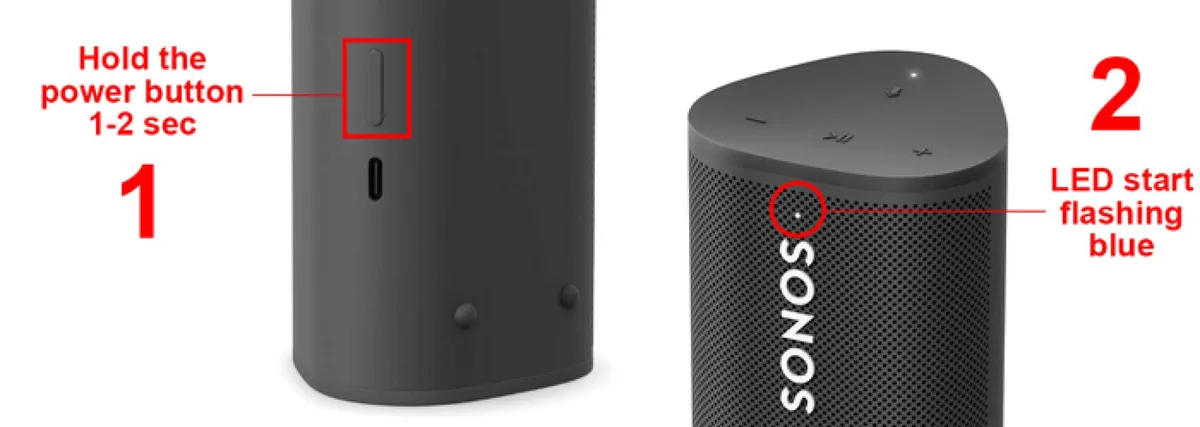
However, the Bluetooth pairing key remains cached locally on the old phone. Since you can’t access that cache, you must regenerate the key. On the bike display, look for "Bluetooth Pairing Mode." Hold the power button until the LED flashes blue.
This forces a new handshake request.
Generic hub motor controllers (like Bafang or CYB) vary wildly. Many lack robust cloud infrastructure. They rely entirely on local file transfers.
If you didn’t export your settings, they are gone. Contact the manufacturer directly. Provide your frame serial number.
Ask for a default configuration file upload. This is rare but necessary for older builds.
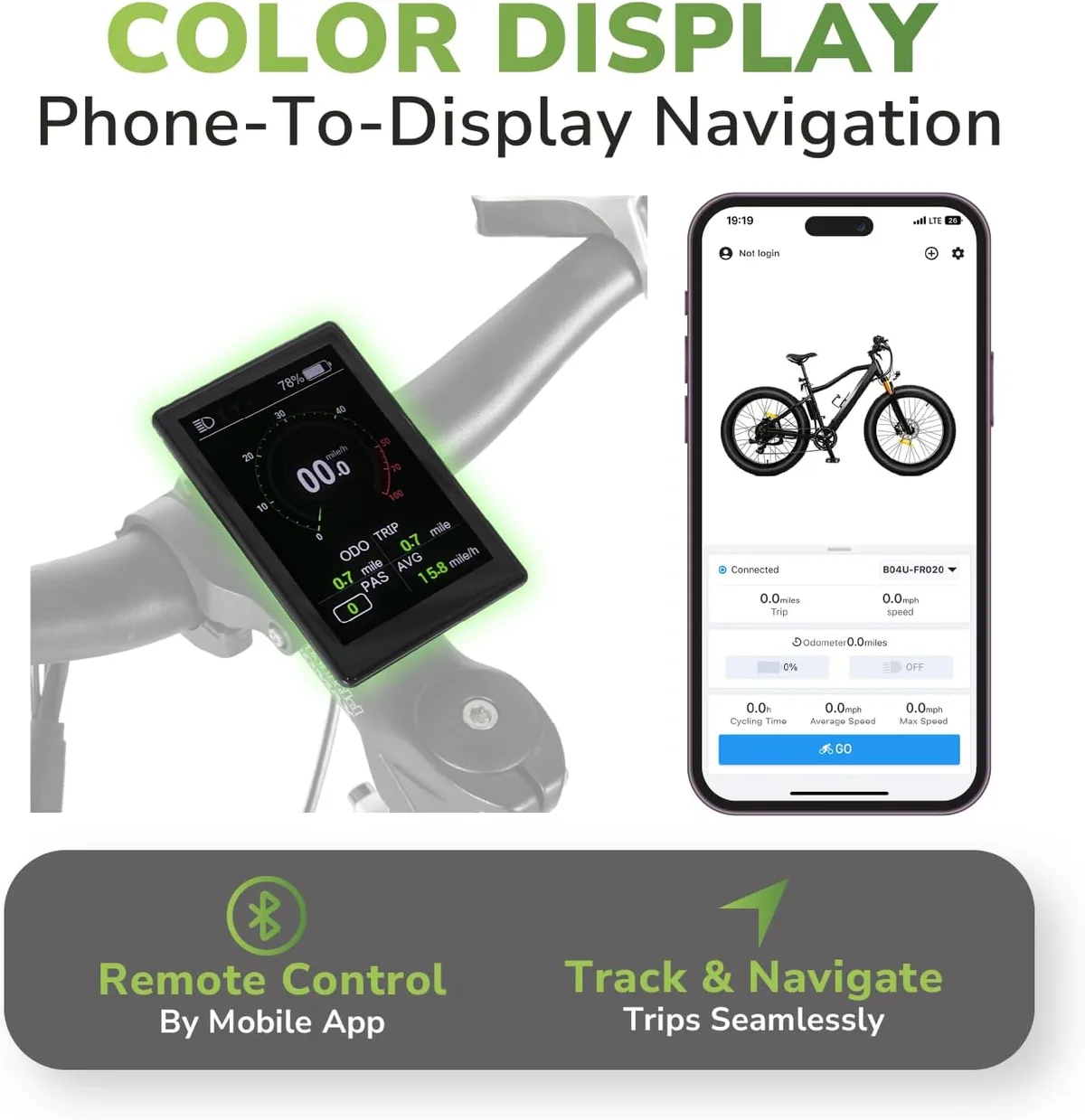
Step-by-Step: Re-Pairing Bluetooth After Account Recovery
Once your account is accessible, the physical connection is next. This is where most technical glitches occur. Bluetooth Low Energy (BLE) protocols are sensitive to interference and permission settings.
Follow this sequence strictly.
First, grant all necessary permissions. iOS requires explicit approval for "Nearby Devices." Android needs "Location Services" enabled for BLE scanning. If you deny these, the app searches forever without finding the bike. Go to your phone’s Settings > Apps > [E-Bike App] > Permissions.
Toggle everything on. Restart the app.
Next, prepare the bike. Turn it off. Remove the battery if possible.
Wait ten seconds. Reinsert the battery. Power on the display.
Do not connect any chargers. Charging ports can interfere with wireless modules. Ensure the bike is stationary.
Moving bikes sometimes disable pairing modes for safety reasons.
Open the app on your new phone. Select "Add Bicycle" or "Pair Device." Scan for nearby signals. Your bike should appear by name or serial number tail.
Tap to connect. A four-digit PIN usually appears on the bike display. Enter this into the app quickly.
These codes expire in sixty seconds.
If you see "Device Already Linked," do not force it. This means the old session hasn’t timed out yet. Wait fifteen minutes.
The server eventually drops stale connections. Alternatively, toggle Airplane Mode on your new phone for ten seconds. This refreshes the radio stack.
Retry the scan. Success rates improve significantly after this reset.
When Self-Service Fails: Contacting Dealer Support Effectively
Sometimes, technology hits a wall. Server-side locks or corrupted firmware prevent standard recovery. At this point, human intervention is required.
But calling support blindly wastes time. Come prepared.
Gather three pieces of information before dialing. First, your frame serial number. It’s usually stamped near the bottom bracket or head tube.
Second, your registered email address. Third, proof of purchase. Dealers need to verify ownership before resetting security flags.
This protects against theft and unauthorized access.
Explain the situation clearly. State that you changed devices. Mention that the old phone is inaccessible.
Specify which error message you see. "Account Locked" is different from "Pairing Failed." Technicians route tickets based on keywords. Accurate descriptions speed up resolution.
Ask specifically about remote unlock capabilities. Some brands allow dealers to push a factory reset command via cellular dongles. Others require you to bring the bike in.
Know the difference. If a shop visit is needed, schedule it immediately. Parts availability affects service slots.
Be aware of warranty implications. Unauthorized third-party repairs void coverage. Stick to authorized networks.
Our research shows that independent shops often lack proprietary diagnostic tools. They can’t read encrypted controller logs. Only certified dealers can perform deep-level resets.
Don’t risk your warranty for convenience.
Expect timelines ranging from 24 to 72 hours. Complex cases take longer. Escalate politely if stalled.
Reference ticket numbers in follow-ups. Persistence pays off, but patience maintains professionalism.
Common Pitfalls That Break Account Recovery
Even simple processes fail due to small oversights. Avoid these frequent mistakes to save yourself stress. Each one creates unnecessary barriers between you and your ride.
Deleting the old app too soon is a classic error. Users assume uninstalling cleans everything. It doesn’t.
Cached tokens might linger in system files. Worse, some apps store pairing keys locally. If you delete the app before syncing, that data vanishes permanently.
Always back up trips first. Then uninstall.
Ignoring firmware updates causes compatibility crashes. Your new phone likely runs a newer OS version. The old app build might not support it.
Update the app before attempting login. Also, check if the bike needs a firmware patch. Mismatched versions cause handshake failures.
Sync both sides to the latest stable release.
Using multiple accounts for one bike confuses the server. Did you sign up with Gmail? Or iCloud?
Or a work email? Switching identities fragments your history. Consolidate under one primary credential now.
Delete duplicate profiles. Keep your riding stats unified. Fragmented data leads to lost mileage records and inaccurate battery health metrics.
Rushing the pairing process breaks the chain. BLE handshakes are timing-sensitive. Entering the PIN slowly triggers timeouts.
Have the code ready before tapping "Connect." Stay close to the bike. Walls and metal objects attenuate signals. Maintain line-of-sight during initialization.
Distance matters less than obstructions.
Protecting Your Ride Data Long-Term
You’ve recovered access, but future-proofing prevents repeats. Enable automatic cloud backups in your app settings immediately. This ensures trip logs and battery health data sync continuously.
If you lose a phone again, the history stays safe on the server. Manual exports are prone to human error. Automation removes that variable entirely.
Manage concurrent session limits wisely. Most brands allow only one active Bluetooth link at a time. Log out of old devices if you sell or gift them.
Leaving orphaned sessions open creates security gaps. It also causes pairing conflicts for new users. Check the "Connected Devices" menu monthly.
Remove any entries you don’t recognize.
Security matters when sharing bikes within households. Create individual profiles rather than sharing one login. Shared accounts mix ride stats and confuse maintenance alerts.
Separate IDs let each rider track their own mileage. They also simplify warranty claims per user. Use strong, unique passwords for each profile.
Two-factor authentication adds another critical layer. Never reuse credentials across different e-bike platforms.
Frequently Asked Questions About App Transitions
Why does my bike say "Device Already Linked"?
This happens because the controller remembers the old phone’s MAC address. The new device can’t override it automatically. You must force a reset via the bike display.
Alternatively, wait fifteen minutes for the server timeout. Then retry the pairing sequence from scratch.
Can I recover data without internet access?
No. Account recovery relies on cloud verification servers. Offline mode only caches recent rides locally.
Once the app uninstalls, local cache is wiped. Always ensure stable Wi-Fi or cellular data during setup. Without connectivity, the handshake fails immediately.
Do I need to update firmware first?
Yes, usually. Mismatched versions cause BLE handshake errors. Update the app on your new phone first.
Then check for bike firmware patches via the connected interface. Manufacturers recommend syncing both sides before pairing. This prevents compatibility crashes during initialization.
What if I forgot my email password?
Use the "Forgot Password" link on the login screen. Enter your registered email address carefully. Check spam folders if the reset link doesn’t arrive.
Wait five to ten minutes for delivery delays. Contact support if the token never appears.

Similar Posts